

n8n AI Agent Not Calling Tools: tool_choice, Provider Compatibility, and Memory
n8n AI Agent not calling tools: diagnose tool_choice, provider compatibility, tool schema and descriptions, result parsing, and memory when connected tools are skipped.
Evidence 4 cited sources
On this page
n8n AI Agent Not Calling Tools: tool_choice, Provider Compatibility, and Memory
An n8n AI Agent can have a Code Tool, HTTP Request Tool, or MCP Tool attached, include a system instruction that says the tool must be used, and still return a direct answer. Adding more emphatic prompt language is not a reliable fix. First determine where the failure happens: the model never emitted a tool call, n8n could not parse the call, the tool ran but its result never reached the agent, or multi-turn memory dropped the execution messages.
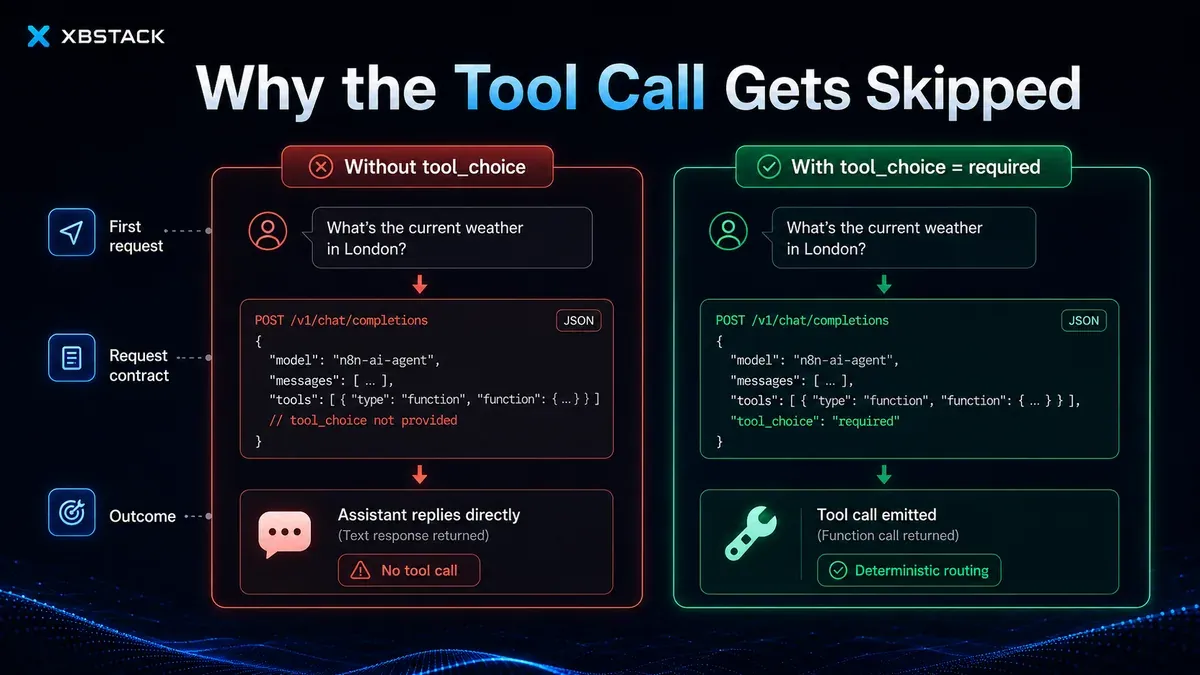
The practical distinction is simple: if the tool node never starts in the execution graph, investigate tool selection and request shape; if the tool node starts and fails, investigate arguments, schema, credentials, and the downstream service. For the first case, n8n issue #31135 reports a concrete boundary: AI Agent v3 can send tools[] to an OpenAI-compatible provider on the first iteration without explicitly sending tool_choice: required. For a model with a weak tool-calling prior, the default auto behavior permits a normal text answer.
This article keeps official reports, local evidence, and unverified claims separate. The issue describes behavior observed in n8n. The local lab only proves that an absent tool_choice and required are different request contracts; it does not present simulated output as a benchmark of Mistral, Ollama, or vLLM.
Start with the execution graph, not the final answer
Open the execution and inspect the AI Agent, chat model, and tool nodes.
| Evidence | Meaning | Next check |
|---|---|---|
| Tool node never ran | No executable tool call reached the tool | tool_choice, provider compatibility, model capability, tool descriptions |
| Tool node ran and schema validation failed | The model called the tool with invalid arguments | JSON Schema, required fields, types, nested data |
| Tool succeeded but agent reports failure | Result parsing or output shape failed | Tool response contract and error branches |
| Single turn works, later turns skip execution | Memory may omit tool calls or results | Stored message types and business state |
| One provider fails and another works | The compatible API may not fully implement tool calling | Raw request and response capture |
The official n8n Tools Agent documentation states that the node uses LangChain’s tool-calling interface to describe available tools and schemas. Exposing a tool does not guarantee that the model selects it; selection still depends on the request contract, provider implementation, and model behavior. Tools AI Agent node
Why “you must call the tool” can still be ignored
A prompt influences model behavior. tool_choice constrains the API request. They operate at different layers.
A first-iteration request may look like this:
{
  "model": "mistralai/Mistral-Small-24B-Instruct",
  "messages": [
    {"role": "system", "content": "You MUST call get_value."},
    {"role": "user", "content": "What is the value?"}
  ],
  "tools": [
    {
      "type": "function",
      "function": {
        "name": "get_value",
        "parameters": {"type": "object", "properties": {}}
      }
    }
  ]
}
The tools array says which functions are available. Without an explicit tool_choice, many compatible APIs treat the request as auto, which allows ordinary prose. A larger model may infer the intended action from the prompt; a smaller model or compatibility layer may simply guess an answer.
The narrow fix proposed in issue #31135 is to force tool use on the first iteration and return to auto after a tool result. Keeping required on every iteration can create repeated calls and prevent the agent from producing a final answer.
The local lab verifies the contract, not model quality
The reproducible files are in:
experiments/n8n-ai-agent-tool-choice/
The lab uses a deterministic OpenAI-compatible provider fixture with one explicit rule:
- tools present without
tool_choice: requiredreturns prose; - tools present with
requiredreturns a structured tool call.
Twenty repeated requests produced:
| Scenario | Runs | Tool calls | Text responses |
|---|---|---|---|
First iteration without tool_choice | 20 | 0 | 20 |
First iteration with proxy-injected required | 20 | 20 | 0 |
Those numbers are deterministic fixture results, not a real-model accuracy measurement. They prove only that a provider treating a missing value as auto has a different contract from one receiving required.
The lab also verifies three boundaries:
- no injection when no tools are bound;
- no override of explicit
noneor another non-default choice; - no forced choice after the history already contains an assistant tool call.
The core logic is intentionally small:
def should_force_tool_use(payload):
    tools = payload.get("tools") or []
    if not tools:
        return False

    for message in payload.get("messages") or []:
        if message.get("role") == "assistant" and (
            message.get("tool_calls") or message.get("function_call")
        ):
            return False

    return payload.get("tool_choice") in (None, "auto")
The directory contains request samples, a generated verification report, and five passing unit tests.
A temporary proxy without modifying n8n source
The preferred long-term outcome is an upstream fix verified against the exact n8n release in use. When a production workflow must keep using a specific compatible provider, a narrow proxy can sit between n8n and that provider:
n8n AI Agent
  -> OpenAI-compatible proxy
     -> inspect tools
     -> detect the first iteration
     -> inject tool_choice=required only there
  -> provider
A production proxy must:
- allow only controlled upstreams and models;
- avoid logging API keys or full sensitive prompts;
- enforce request-size, timeout, and concurrency limits;
- preserve explicit
none, named choices, and later iterations; - log whether it injected a choice, the model, tool count, and a redacted request digest;
- provide a fast rollback switch.
Do not blindly modify arbitrary JSON in a Code node and forward it. A proxy that cannot identify iteration boundaries may force the second iteration too, producing repeated emails, refunds, deployments, or an infinite tool loop.
When a tool call exists but execution still fails
At this point tool_choice is no longer the primary cause. Continue with four checks.
Does the provider support the actual schema?
Public issues include cases where a model emits a call and n8n reports Received tool input did not match expected schema. Common causes include:
- an object schema receiving a string;
requiredfields that do not match the real tool input;- nested objects or arrays flattened by a compatibility layer;
- enum values outside the declared set;
- different field names between the declared tool and a Tool Workflow.
Reduce the workflow to one parameter-free constant tool, then add arguments back one at a time. If the constant tool cannot run, investigate provider and request shape. If it runs but a complex schema fails, investigate the schema.
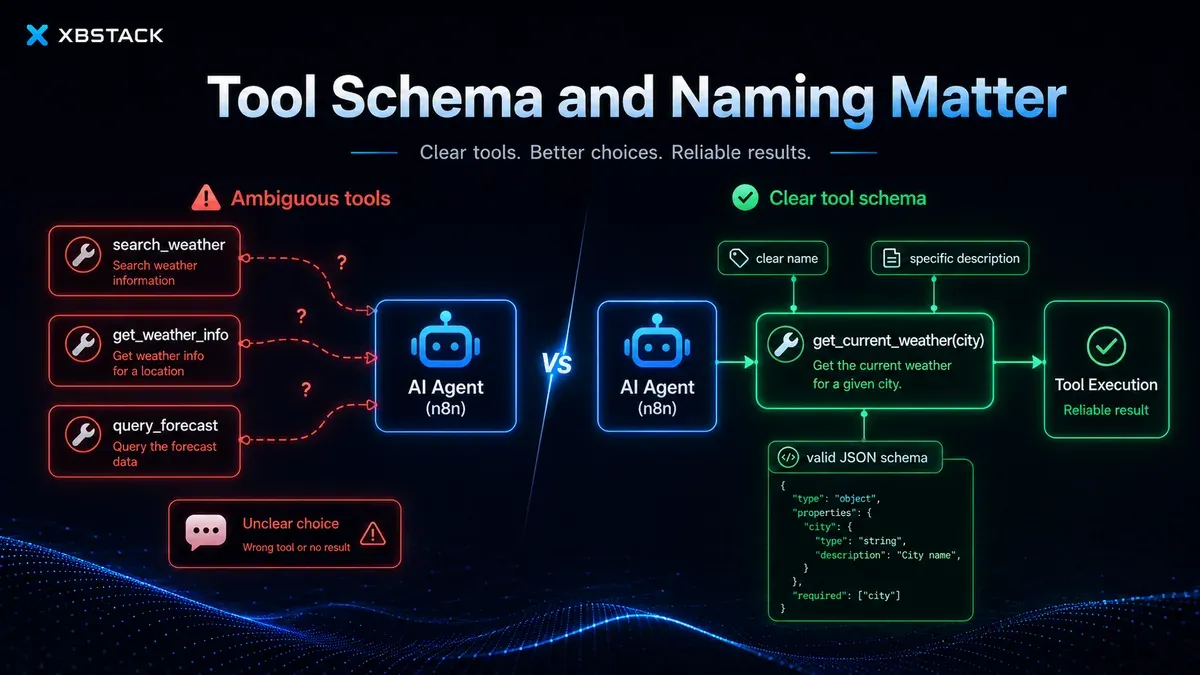
Are tool names and descriptions competing?
Issue #15883 describes identical prompts that sometimes call one tool, sometimes both, and sometimes none. Similar descriptions create an unstable routing problem.
Prefer action-and-object names:
get_customer_order_status
create_customer_refund_draft
send_refund_confirmation_email
Avoid vague siblings such as customer_tool, support_tool, and order_helper. State the input, output, side effects, and prohibition conditions in every description.
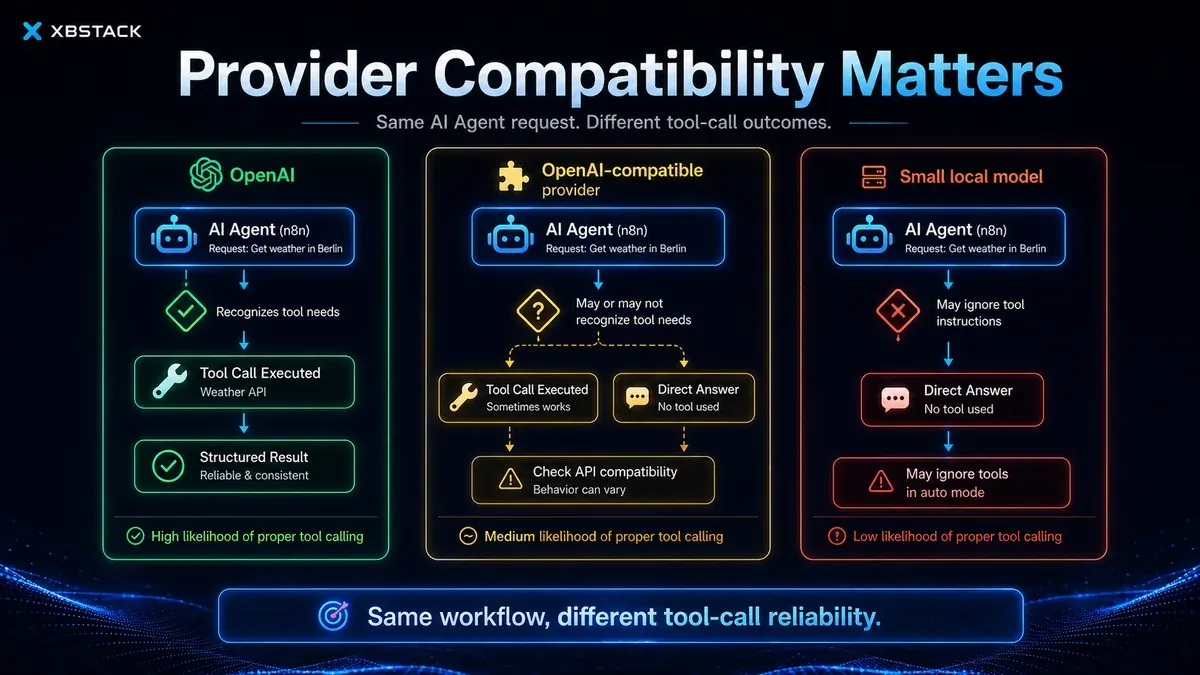
Does “OpenAI compatible” include full tool calling?
A compatible endpoint often guarantees only a similar URL and a subset of fields. It may not guarantee:
- every
tool_choicevariant; - parallel calls;
- streamed argument deltas;
- the same JSON Schema support;
- stable call IDs and tool-result linkage;
- complete multi-turn message preservation.
Capture the raw request and response. Pin the model and provider version. Keep one minimal known-good sample.
Is the tool result structured for the agent?
Long prose, HTML, or a huge JSON object can hide the load-bearing value. Prefer a stable result contract:
{
  "ok": true,
  "data": {"value": 42},
  "error": null,
  "audit_id": "tool-20260726-001"
}
The model can read ok and data, while the execution and downstream systems retain a durable audit identifier.
Why multi-turn agents can claim execution without executing
Issue #14361 reports memory backends that persist user input and final assistant output but omit the tool call and tool result. The model later sees a pattern where a user requested an action, the assistant text said it succeeded, and the conversation continued. It may reproduce the success text without performing the action.
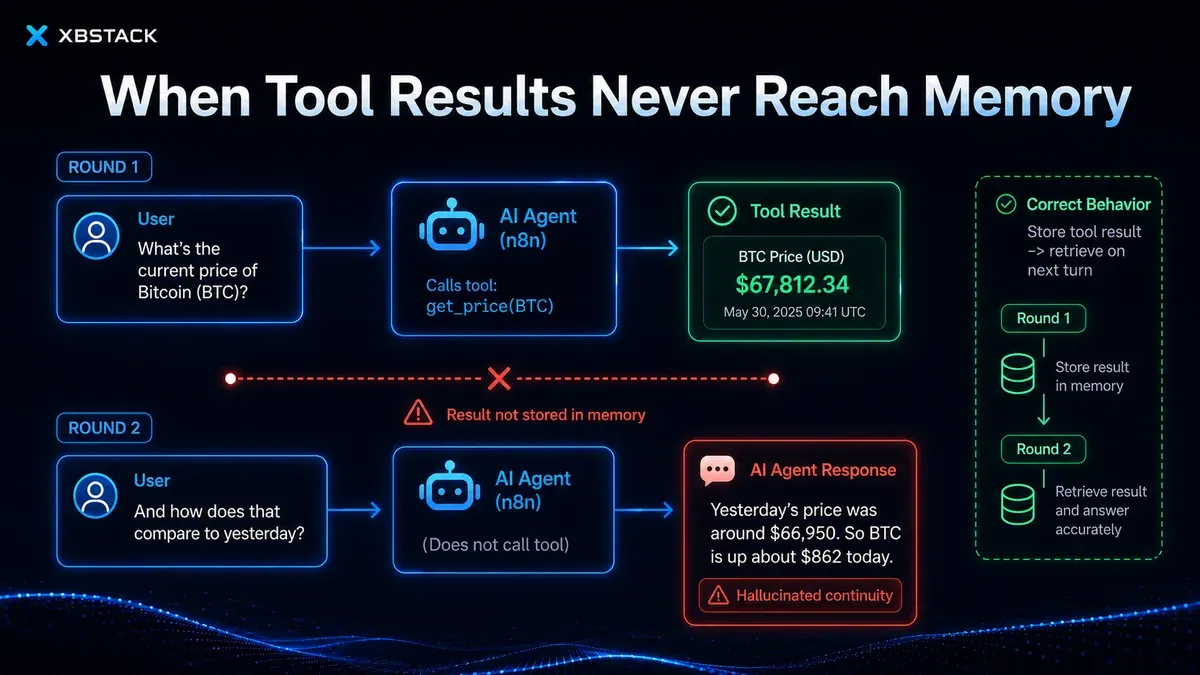
Debug this by:
- inspecting the exact message types persisted by the memory backend;
- verifying that call IDs, argument digests, and tool results are stored;
- never treating the assistant’s claim as authoritative business state;
- storing order IDs, approval IDs, and task status in a database rather than only in conversation memory;
- returning an audit ID from every side-effecting tool and re-querying authoritative state when needed.
Memory helps the model understand a conversation. It must not be the only ledger for payments, orders, email delivery, or deployments.
A practical debugging order
1. Check whether the tool node starts
2. Keep one parameter-free constant tool
3. Repeat one fixed input 10 times
4. Capture the provider request and response
5. Inspect tools and tool_choice
6. Compare with a model known to support tool calling
7. Reintroduce schema, multiple tools, and memory gradually
8. Verify tool results and cross-turn state
9. Add audit IDs and idempotency keys for side effects
Change one variable at a time. If the model, prompt, schema, provider, and memory are all changed together, a successful run still does not identify the actual fix.
The reproducible lab is available in the public GitHub directory. It requires no API key and reruns both the request-contract fixture and five unit tests. For framework-level behavior, compare the observed execution with n8n’s current AI Agent documentation and Advanced AI documentation; the local lab is evidence for the request/execution contract, not a replacement for upstream documentation.
Final decision
“n8n AI Agent not calling tools” is a symptom shared by several failure classes: a missing first-iteration tool_choice, incomplete provider compatibility, weak tool selection, invalid schema, ambiguous descriptions, result parsing, and missing tool messages in memory.
The load-bearing evidence is not a sentence saying “I called the tool.” It is an execution that contains a real tool call, a tool node result, persisted state, and an audit record for external side effects. Prompts can influence the model; they cannot replace the request contract or execution evidence.
Continue with n8n AI Workflow error handling, retries, and cost monitoring, AI Agent Tool Use: registry, validation, and audit, and self-hosted n8n AI workflows.
Continue through the production automation path
The workflow hub connects self-hosting, queue mode, webhooks, retries, observability and n8n implementation cases into one production-oriented learning path.
Next step: make the workflow operable
Full decision path →Continue with retries, queues, idempotency, observability, or cost controls that keep the workflow reliable.

DISCUSSION
Questions, verification and corrections
Sign in to comment. Every new comment is reviewed before publication; while pending, it is visible only to you and the administrator.